How do I build a WhatsApp customer service bot in n8n?
You import a JSON into n8n, add your credentials and describe your business in one place. From then on every WhatsApp message gets an AI reply; if the customer asks for a person or the bot doesn't know, it alerts you and goes quiet in that chat; and if you reply from your phone, the bot goes quiet by itself. It's below, free, with the 5 steps to get it running.
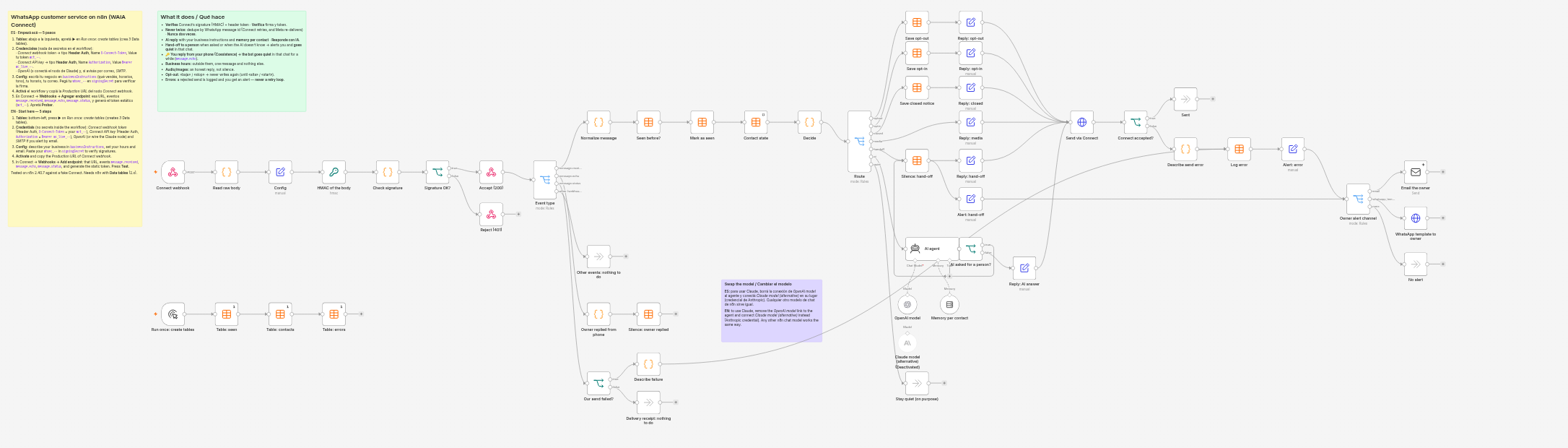
How it works
- Connect webhook arrives
- Signature and token
- Seen before?
- Contact state
- Decide
- AI · person · hours · media · opt-out
- POST /v1/messages
And on the side: message.echo (you replied from the phone) → the bot goes quiet in that chat · a failed message.status → logged and alerted, no retry.
What it does, one by one
- Checks the message comes from Connect: the header token (n8n checks it before running anything) and the HMAC signature
X-Connect-Signature-256overtimestamp.body, with a 5-minute tolerance. A bad signature gets a 401. - Never replies twice. Connect retries when it doesn't get a 2xx, and Meta sometimes re-delivers the same message (Connect forwards it with another event id but the same WhatsApp id). The workflow records the WhatsApp id and also sends an
Idempotency-Keytied to it: even if something repeats, Connect doesn't send another reply. - Replies with AI reading your business instructions (what you sell, hours, tone) from a single field, with per-contact memory. The model is a separate node: OpenAI is wired, and a Claude node is ready to swap in.
- Hands off to a person when the customer asks or when the AI doesn't know (it answers a marker the customer never sees): it tells them someone will take over, alerts you and goes quiet in that chat for the hours you choose.
- 🔑 If you reply from your phone, the bot goes quiet in that chat for as long as you choose. Coexistence makes this possible: Connect sends you
message.echowith what you typed in the app. When the bot comes back, the AI knows what you said. - Opening hours: outside them it sends one message and nothing else (it doesn't repeat on every message).
- Audio, image, video, sticker, location: an honest reply («I only read text, can you type it?»), not silence.
- Opt-out: if they write «baja» or «stop», it confirms once and never writes again; «alta» or «start» brings them back.
- Errors: if Connect rejects a send (wrong key, expired trial, disconnected number, quota) or Meta rejects it later (e.g. the 24-hour window), it's written to a table and you get an alert. It never retries, and a failed alert doesn't trigger another alert: no loop is possible.
Download it
Get it running in 5 steps
- Import it. In n8n: Workflows → ⋮ → Import from File and pick the JSON. Press ▶ on the Run once: create tables node (it creates the 3 tables it uses: duplicates, contacts, errors).
- Credentials (the workflow ships no secrets): Connect webhook token — type *Header Auth*, Name
X-Connect-Token, Value yourwct_…token; Connect API key — *Header Auth*, NameAuthorization, ValueBearer wc_live_…(in the panel: API → Create API key); OpenAI (or Anthropic); and SMTP if you want email alerts. - Config. Open the Config node and describe your business in
businessInstructions, your hours inopeningHours, your email inownerEmail. To check signatures, paste yourwhsec_…insigningSecret. - Activate it (the toggle at the top) and copy the Production URL of the Connect webhook node. ⚠ The Test URL listens only once.
- In Connect → Webhooks → Add endpoint: that URL, events
message.received,message.echoandmessage.status, and generate the static token. Press Test: it must give 200. Then send yourself a WhatsApp from another phone.
Isn't n8n's own WhatsApp node enough?
n8n ships its own WhatsApp node, which talks straight to Meta. Often it's enough, and it's free: if you already have a Meta app, your number is on the Cloud API and you don't use the WhatsApp Business app on the phone, use that.
What changes with Connect, plainly (what we say about n8n's node comes from its code, version 2.40.7):
| n8n's WhatsApp node | With WAIA Connect | |
|---|---|---|
| Price | Free (Meta still charges its messages) | From US$ 12 a month (Starter), 14-day trial; Meta still charges its messages |
| Meta app | You create and set it up (app, token, webhook) | Not needed: you connect the number with Meta's signup from the panel |
| Keep using the app on the phone (Coexistence) | The trigger doesn't offer the event for what is sent from the phone (smb_message_echoes): the bot never learns you replied | Yes: message.echo carries what you typed in the app, and this workflow goes quiet by itself |
| How many workflows receive | One trigger per Meta app (the node itself says so) | One or more endpoints, per account or per number |
| If your n8n goes down | Meta retries on its side | Connect tries up to 5 times over about 2.5 hours, signed and with the same id, and warns you before pausing |
If you need nothing from the right-hand column, stick with n8n's node. The workflow still works as an example: the ideas (record the WhatsApp id, answer 200 before the AI, never send free text outside the 24 hours, never retry blindly) apply to any provider.
Worth knowing first
- It needs an n8n with Data tables (we tested on 2.40.7). That's where it keeps duplicates, each contact's state and the errors; you'll see them under Data tables.
- The AI memory lives inside n8n: it's lost when n8n restarts and doesn't work in queue mode. For something durable, swap the memory node for the Postgres or Redis one with the same key.
- The signing secret stays inside the workflow (Config node): n8n doesn't let a node read a credential. Remove it before exporting or sharing the workflow. The header token and the API key do live in credentials.
- n8n's Code node can't use
cryptoon a self-hosted install (it's disallowed by default): that's why the signature is computed with the Crypto node. - The alert to your WhatsApp goes as a template, never as free text: outside the 24-hour window Meta rejects it. Without an approved template, use email.
- The app's automatic messages (greeting, away) also leave from the phone. We couldn't measure it: if you have them on, they may count as your reply and silence the bot.
- From 1 October 2026 Meta also charges replies inside the 24-hour window, per message. Every bot reply carries that Meta cost; Connect adds nothing on top.
Does your bot live in a Google Sheet?
If you don't use n8n and built your bot on a spreadsheet, there's the Google Sheets guide. The exact shape of every event is in Receive the webhook.
Sources (checked on 2026-09-29)
Connect your first number today
Meta-verified technology provider. Coexistence in one click.
Get started